Billing
Bramble can show each server's billing details from WHMCS, Paymenter or DezerX Spartan:
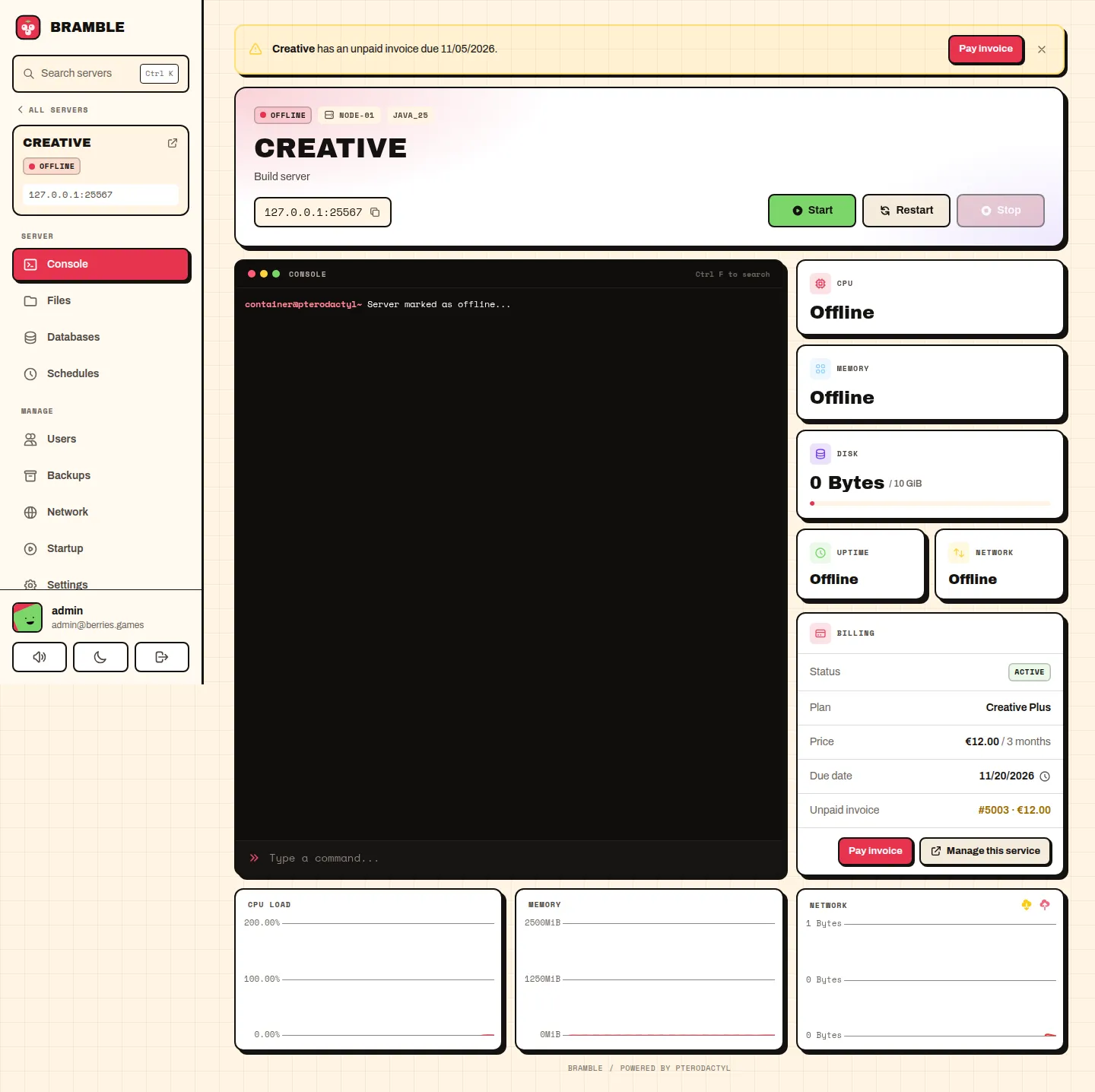
- A Billing card on the server's console page: status, plan, price per cycle, due date, any unpaid invoice, and Pay invoice and Manage this service buttons.
- Warnings on the dashboard and the console when a server is due soon, has an unpaid or overdue invoice, or is suspended. Players can dismiss them; they come back when something changes (a day closer, a new invoice).
Only a server's owner (and admins) see billing details. Sub-users never see prices or invoices.
Setting it up
- Go to Admin → Theme → Billing.
- Pick your billing system.
- Enter its address (the one your customers use) and its API credentials (see below).
- Choose how many days before the due date to warn players.
- Save, then use Test connection to look up one of your servers.
WHMCS
- In WHMCS go to System Settings → API Credentials → Generate New API Credential.
- Give it a role that allows
GetClientsProducts,GetInvoicesandGetClientsDetails. - Paste the identifier and secret into Bramble.
- Add your panel server's IP under General Settings → Security → API IP Access Restriction.
Paymenter
- In Paymenter go to Admin → API Keys and create an admin key that can read services and invoices.
- Paste it into Bramble as the API key.
DezerX Spartan
- Create an application API token that can read services.
- Paste it into Bramble as the API key.
- Spartan's API doesn't send a currency, so fill in Currency (for example
EUR).
How servers are matched
A server is matched to its billing service by its external ID. The WHMCS, Paymenter and Spartan Pterodactyl modules set it to the service ID when they create a server, so servers your billing system made work straight away.
For a server you made by hand, set its external ID to the service number under Admin → Servers → (server) → Details. A value like whmcs-42 works too: Bramble uses the number at the end.
Test connection tells you if a server has no external ID.
Link addresses
The buttons go to your billing system's usual pages. If yours are different (a custom client area, a reverse proxy), set them under Link addresses, using {base} for your billing address and {id} for the service or invoice number.
| System | Manage this service | Pay invoice |
|---|---|---|
| WHMCS | {base}/clientarea.php?action=productdetails&id={id} | {base}/viewinvoice.php?id={id} |
| Paymenter | {base}/services/{id} | {base}/invoices/{id} |
| DezerX Spartan | {base}/services/{id} | {base}/invoices/{id} |
Good to know
- Speed: answers are cached for 5 minutes (1 minute after a failure), so pages never wait on your billing system.
- If your billing system is down, the card and warnings are simply hidden. The error goes to the panel's log (
storage/logs). - Security: the API key is stored encrypted with your panel's app key, and is never sent to a browser or shown on the settings page.
- Paymenter doesn't report the billing cycle through its API, so prices show without "/ month".
- WHMCS invoices belong to the client, not to one service, so an unpaid invoice shows on each of that client's servers.
Troubleshooting
| Test connection says | Fix |
|---|---|
| WHMCS said: Authentication Failed | Check the identifier and secret, and the API IP restriction. |
| HTTP 401 or 403 | The API key is wrong, disabled, or doesn't have permission to read services. |
| has no service #… | The server's external ID isn't a service in your billing system. |
| has no external ID | Set it under the server's Details page. |
| A timeout or connection error | Check the billing address, and that the panel's server can reach it. |